
Download AOL Radio – Free Streaming Radio for Mac
Overview & First Impressions
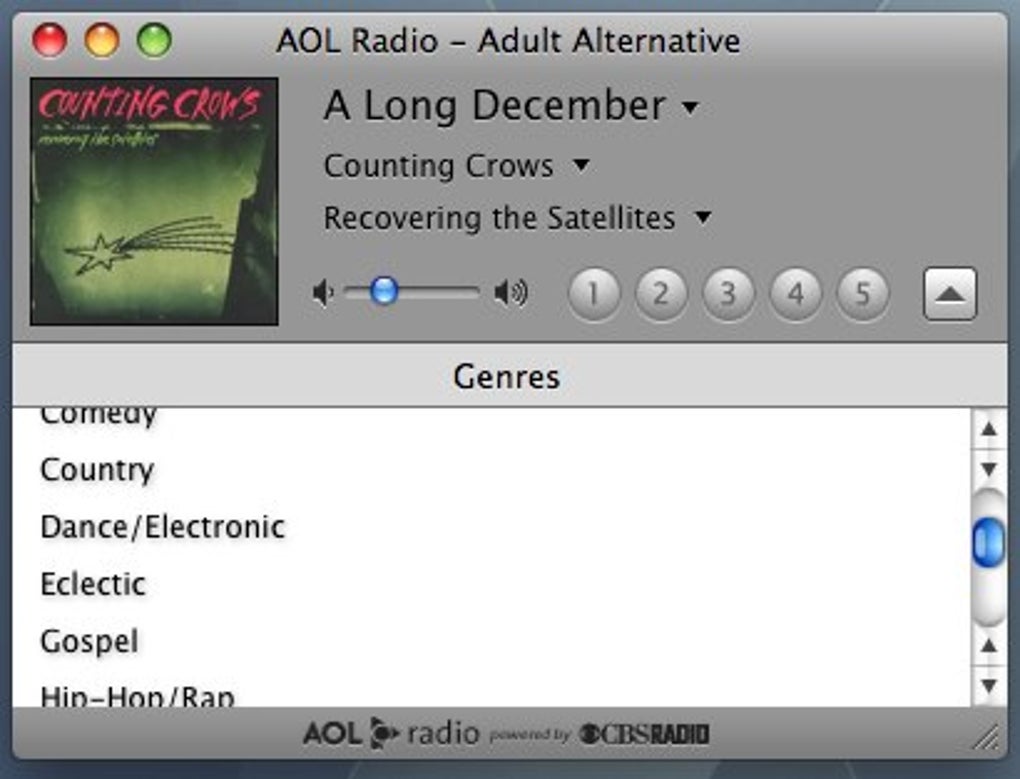
AOL Radio is a dedicated streaming radio client for macOS that aggregates more than 350 stations from the CBS network and beyond. Designed with a Leopard‑style interface, the app presents a clean, two‑pane layout where users can browse 25 genres at the bottom of the window, double‑click a genre to reveal its stations, and start listening with a single click. The promise of up to ten presets (currently five visible) makes it easy to keep favorite channels at hand, while the right‑click context menu lets you confirm which station occupies each slot. Though the catalog is limited to American broadcasters, the sheer volume—over 200 stations in 25 genres plus 150 CBS‑specific channels—covers everything from soul and hard rock to techno, talk shows, and news. The player feels lightweight, launches instantly, and streams without the typical buffering delays seen in browser‑based radio sites. Its integration with macOS makes it feel native, and the lack of intrusive ads gives it a professional edge over many free web radio services. In short, AOL Radio offers a secure, free way to access a massive selection of US radio content directly from your desktop.
Key Features of AOL Radio
- Access to over 350 live radio stations across 25 musical and talk‑show genres.
- Native macOS interface optimized for Leopard and later versions, delivering a smooth visual experience.
- Easy preset system: assign up to ten favorite stations (five visible by default) with a single click.
- Right‑click station details to verify or modify presets without leaving the player.
- Searchable genre list at the bottom of the window for quick navigation.
- Automatic stream quality adjustment to maintain continuous playback on slower connections.
- Free to download and use, with no hidden subscription fees.
- Secure streaming via HTTPS to protect user privacy while listening.
- Regular updates that add new stations and improve stability.
- Minimal CPU and RAM footprint, making it suitable for older Mac hardware.
Installation, Setup, and Compatibility
Getting started with AOL Radio is straightforward. First, visit the official AOL Radio download page and click the Download for Mac button. The installer is a standard .dmg package; once opened, drag the AOL Radio icon into your Applications folder. macOS may prompt you to confirm that you trust the developer—simply click “Open” to proceed.
After installation, launch AOL Radio from the Applications folder or via Spotlight. The initial launch may request permission to access your network; this is required for streaming live audio. Once granted, the main window appears, displaying the genre bar at the bottom. Choose a genre, double‑click a station, and the stream begins instantly. To create a preset, click the numbered button (1‑5) while a station is playing; a checkmark confirms the assignment. Right‑click any preset button to view the station name or to replace it with a different channel.
Compatibility: AOL Radio officially supports macOS 10.5 Leopard and later versions, including macOS Ventura. The app runs natively on Intel‑based Macs and, thanks to Apple’s Rosetta 2 translation layer, also works on Apple Silicon (M1/M2) machines without performance loss. System requirements are modest—at least 512 MB of free RAM and a stable internet connection (minimum 128 kbps recommended). The application does not require additional codecs or plugins, as all streams are delivered in standard AAC or MP3 formats.
For users who prefer command‑line tools or automated setups, AOL Radio can be launched with the open -a "AOL Radio" command, and preferences (such as default volume and preset count) are stored in a hidden ~/Library/Preferences/com.aol.radio.plist file, allowing backup and migration across machines.
Pros, Cons, and Frequently Asked Questions
Pros
- Free and ad‑free listening experience.
- Large library of US stations covering diverse genres.
- Native macOS design that feels integrated and responsive.
- Simple preset system for quick access to favorite channels.
- Low resource consumption, suitable for older Macs.
Cons
- Station catalog limited to American broadcasters; no international stations.
- Preset UI shows only five slots despite supporting ten presets.
- No built‑in equalizer or advanced audio controls.
- Occasional latency when switching between high‑bitrate streams on slow connections.
- Lack of mobile app counterpart (iOS/Android) for seamless cross‑device listening.
Frequently Asked Questions
Is AOL Radio completely free, or are there hidden fees?
AOL Radio is 100 % free to download and use. There are no subscription fees, in‑app purchases, or hidden costs. The service is supported by AOL’s partnership with CBS, which provides the streaming infrastructure.
Can I listen to AOL Radio on Windows or Linux?
Currently, AOL Radio is only released for macOS. Windows and Linux users can still access many of the same stations through the web player on AOL’s website, but the dedicated desktop client is mac‑only.
How do I change the audio quality of a stream?
AOL Radio automatically selects the best quality based on your internet speed. If you experience buffering, you can manually select a lower‑bitrate stream by right‑clicking the station name and choosing “Lower Quality” from the context menu.
Is there a way to record a live broadcast?
AOL Radio does not include a built‑in recording feature. Users who need to capture audio must rely on third‑party macOS recording tools such as Audio Hijack or QuickTime Player’s screen‑recording mode.
Will my presets sync across multiple Macs?
Presets are stored locally on each machine. To sync them, you can copy the com.aol.radio.plist file from ~/Library/Preferences/ to the same location on another Mac, or use a cloud‑based file sync service such as iCloud Drive.
Conclusion & Call to Action
Overall, AOL Radio stands out as a reliable, free, and user‑friendly streaming solution for Mac enthusiasts who want instant access to a massive catalog of U.S. radio stations. Its native design, lightweight footprint, and straightforward preset system make it an excellent choice for both casual listeners and power users who appreciate a clutter‑free audio experience. While the absence of international stations and a few UI quirks (like the five‑preset display) may limit its appeal to some, the core offering—over 350 live channels across every major genre—delivers tremendous value at zero cost.
If you’re looking for a secure, no‑ads way to fill your Mac with music, talk, and news, download AOL Radio today and start exploring the diverse world of CBS‑powered broadcasting. Click the button below to begin your free download, install the app, and enjoy uninterrupted streaming right from your desktop.
Pros: Free, large US station lineup, native Mac UI, low resource usage.
Cons: US‑only stations, limited preset visibility, no mobile app.







